

In the digital age, standing out with eye-catching visuals is no longer reserved for design pros. Thanks to platforms like Remaker AI, anyone can transform ordinary photos and videos into spectacular content—from hilarious face swaps to ultra-sharp, professional headshots. This guide is your go-to resource for mastering Remaker AI’s web-based suite, perfect for content creators, marketers, freelancers, and anyone eager to elevate their online presence with minimal effort and no technical headaches.
What is Remaker AI and Why Should You Use It?
Remaker AI is a powerful, web-based collection of AI-driven tools designed to make advanced image and video edits accessible to everyone. No downloads, no costly software—just seamless, browser-based creativity. You can swap faces in photos and videos, generate polished portraits, upscale images, enhance video quality, and even remove backgrounds, all with a few clicks. The platform is especially friendly to beginners, offering free credits upon sign-up so you can explore and experiment without risk.

- User-friendly interface—no editing experience required
- Realistic face swaps for photos and videos
- AI-powered portrait and headshot generation
- High-quality image upscaling and video enhancement
- Flexible, credit-based pricing—pay only for what you use
Learn more about Remaker AI’s features and tools directly from the official Remaker AI website. Remaker AI
Getting Started: Sign Up and Understand the Credit System
Ready to dive in? Signing up only takes a few seconds. Once registered, Remaker AI grants you free credits so you can test-drive face swaps, image enhancements, and more before ever reaching for your wallet. The credit-based system is refreshingly flexible: buy more only when you need them (no sneaky subscriptions!), and your purchased credits never expire. Whether you edit once a year or every day, Remaker AI adapts to you.
- Visit the official Remaker AI website and click ‘Sign Up’.
- Enter your email, create a password, and confirm your registration.
- Receive free credits instantly and start exploring the tools.
- Check your credit balance anytime in your account dashboard.
Tip: Use your initial free credits to experiment with different features. If you run out, you can always purchase more credits as needed—with no commitment!
Face Swapping Made Simple: Photos and Videos
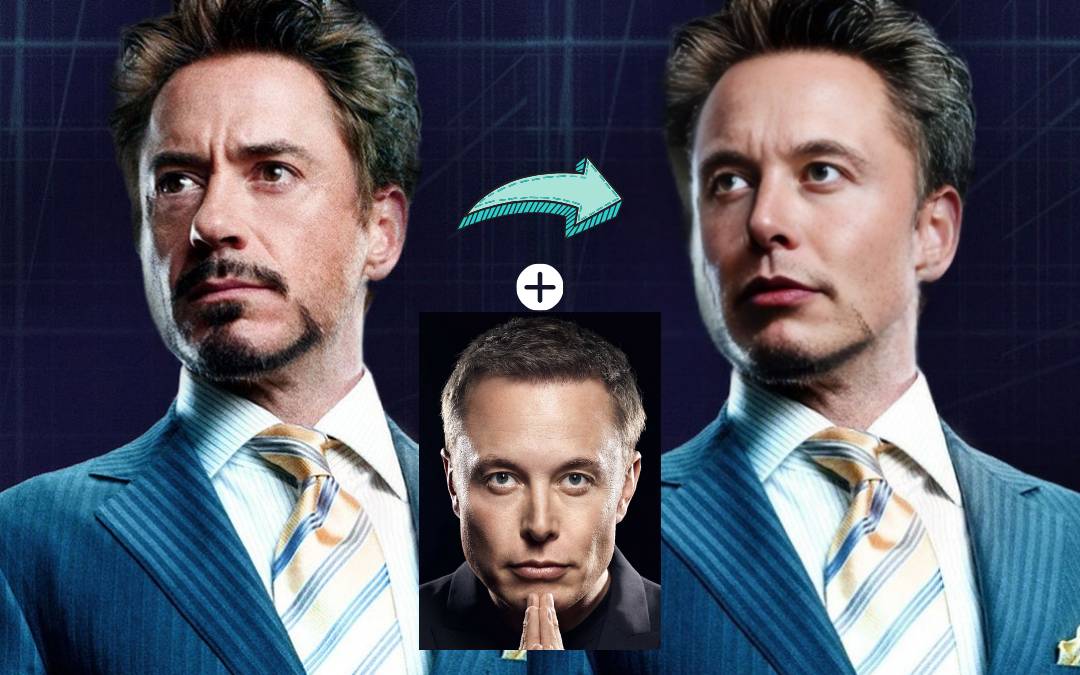
Face swapping isn’t just for memes (though, let’s be honest, it’s pretty great for that). With Remaker AI, you can swap faces on group photos for fun, replace a model’s face in a marketing shot, or even create engaging video content with entirely new characters. The process is fast, realistic, and requires no manual retouching.

How to Swap Faces in Photos
- Log into your Remaker AI account.
- Select the ‘Face Swap’ tool from the dashboard.
- Upload the original image and the new face photo.
- Adjust the placement (if necessary)—Remaker AI’s smart detection usually does the job automatically.
- Preview and finalize your result. Download with a click when you’re satisfied.
How to Swap Faces in Videos
- Choose the ‘Video Face Swap’ option after logging in.
- Upload your video and the face image you’d like to swap in.
- Let the AI process your video (this may take a few minutes, depending on length).
- Review and download your enhanced video.
Humor: Ever wanted to see yourself as the hero in your favorite movie clip? Now’s your chance—just remember, with great power comes great responsibility (and possibly, giggles).
Next-Level Image Enhancement: Portraits, Upscaling, and Background Removal
Remaker AI isn’t just about swapping faces—it’s a full-fledged enhancement suite for all your visual content needs. Whether you want crystal-clear profile pics, need to upscale a blurry image for print, or crave spotless background removal for your shop’s product images, Remaker’s AI does it all in seconds.

- Portrait and Headshot Generator: Create studio-quality headshots for resumes, LinkedIn, or online portfolios.
- Image Upscaling: Increase image resolution up to 4K with no pixelation.
- Background Removal: Instantly remove or swap backgrounds for cleaner presentations.
Practical Enhancement Workflow
- Select the desired enhancement tool (portrait, upscaling, or background removal).
- Upload your image(s) and let the AI work its magic.
- Fine-tune the output if prompted, then download your improved visuals.

My take: The AI upscaling and background removal tools are a game-changer for small business owners who want pro-quality images without the pro budget. I tried upscaling a grainy old snapshot—the results were honestly jaw-dropping.
Maximizing Results: Tips, Tricks, and Credit Management
Unlocking the full power of Remaker AI is all about smart choices and a little experimentation. Here are some hands-on suggestions to get the most from your credits and consistently stunning results.

- Use high-resolution input images for best AI results.
- Try multiple photos for face swaps to see which pairing looks most natural.
- Save credits by batching your edits—upload several images to process in one go.
- Preview before committing to a download to avoid wasted credits.
| Feature | Best Use Case |
|---|---|
| Face Swap | Fun social posts, marketing visuals, content personalization |
| Portrait Generator | Corporate headshots, profile photos, branding |
| Image Upscale | Print designs, website banners, restoring old photos |
| Background Removal | Product photos, graphics for ads, e-commerce |
| Video Enhancement | YouTube, TikTok, HD marketing videos |
Pro tip: Take advantage of free credits to experiment. Once you find your favorite features, buying a small credit pack is often more cost-effective than using subscriptions elsewhere.
Remaker AI: Safety, Authenticity, and Official Access
A word of caution: Remaker AI currently does not offer an official mobile app. All services are web-based, accessible only through the official website. If you encounter any app in an app store claiming to be Remaker AI, it’s not legitimate. Always use the website to keep your content and data secure.

Read the latest important notice about the official Remaker AI app to stay updated on platform authenticity. official Remaker AI app
FAQs: Your Remaker AI Questions Answered
Is there a free version of Remaker AI?
Yes! Signing up gives you free credits to try out all the major features before deciding to buy more.
Do I need to install anything to use Remaker AI?
No installation required—all tools run securely in your web browser.
How long do purchased credits last?
Purchased credits never expire. Use them whenever you need—no pressure.
Can I use Remaker AI for professional projects?
Absolutely! Many freelancers and small businesses use Remaker AI for everything from marketing materials to client presentations.
Are my photos and videos safe?
Remaker AI takes privacy seriously. Always access the platform via the official website to ensure your data remains secure.




