

Kapwing is one of the most popular browser-based video editors for creators, social media managers, and small teams. It combines editing, AI-powered tools, and collaboration in a way that’s approachable even if you’ve never touched Premiere or Final Cut. But its pricing page can feel confusing when you’re trying to decide which plan actually fits your workload and budget.
In this guide, we’ll break down Kapwing’s Free, Pro, Business, and Enterprise plans in plain English, explain how credits and limits really work, and walk through real-world use cases like solo YouTubers, TikTok creators, agencies, and in-house social teams. We’ll also look at where Kapwing fits in a modern creator stack, and why all-in-one creator platforms like UUININ—with AI video editing, automated content generation, and integrated monetization—are becoming the long-term backbone for serious creators.
Kapwing Pricing Plans at a Glance
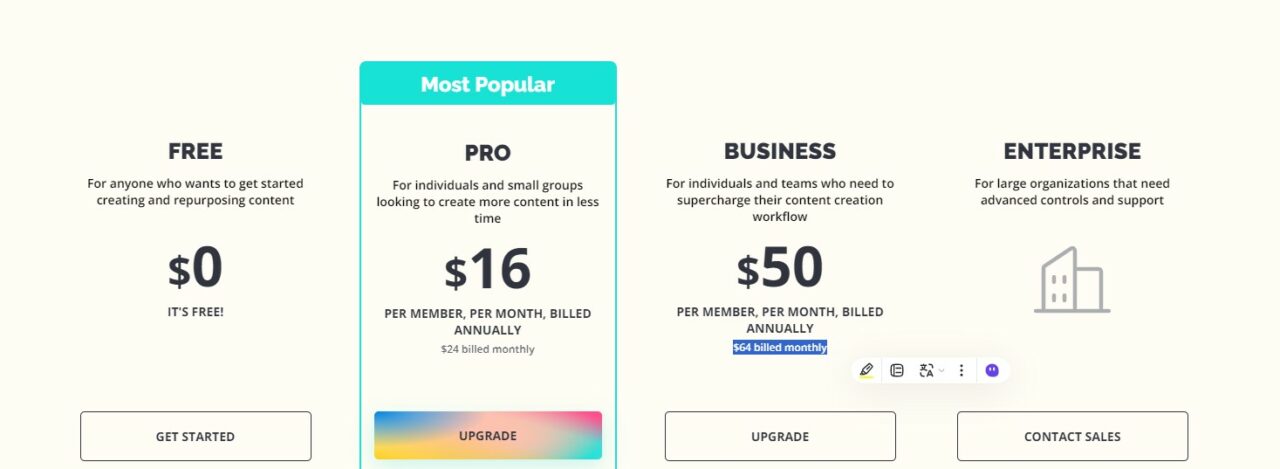
As of late 2025, Kapwing offers four tiers: Free, Pro, Business, and Enterprise. The biggest differences between them are export quality and length, AI credits, collaboration features, and admin controls.
| Plan | Price (per member) | Best For |
|---|---|---|
| Free | $0 | Testing Kapwing, occasional simple edits, non-commercial use |
| Pro | $16/month billed annually or $24/month billed monthly | Solo creators, freelancers, small teams with moderate usage |
| Business | $50/month billed annually or $64/month billed monthly | High-volume creators, in-house social teams, small agencies |
| Enterprise | Custom pricing | Large organizations needing SSO, advanced security, custom limits |
You can check the latest Kapwing pricing details directly on the official Kapwing pricing page under Kapwing pricing before you subscribe. Kapwing pricing
Key feature differences by plan
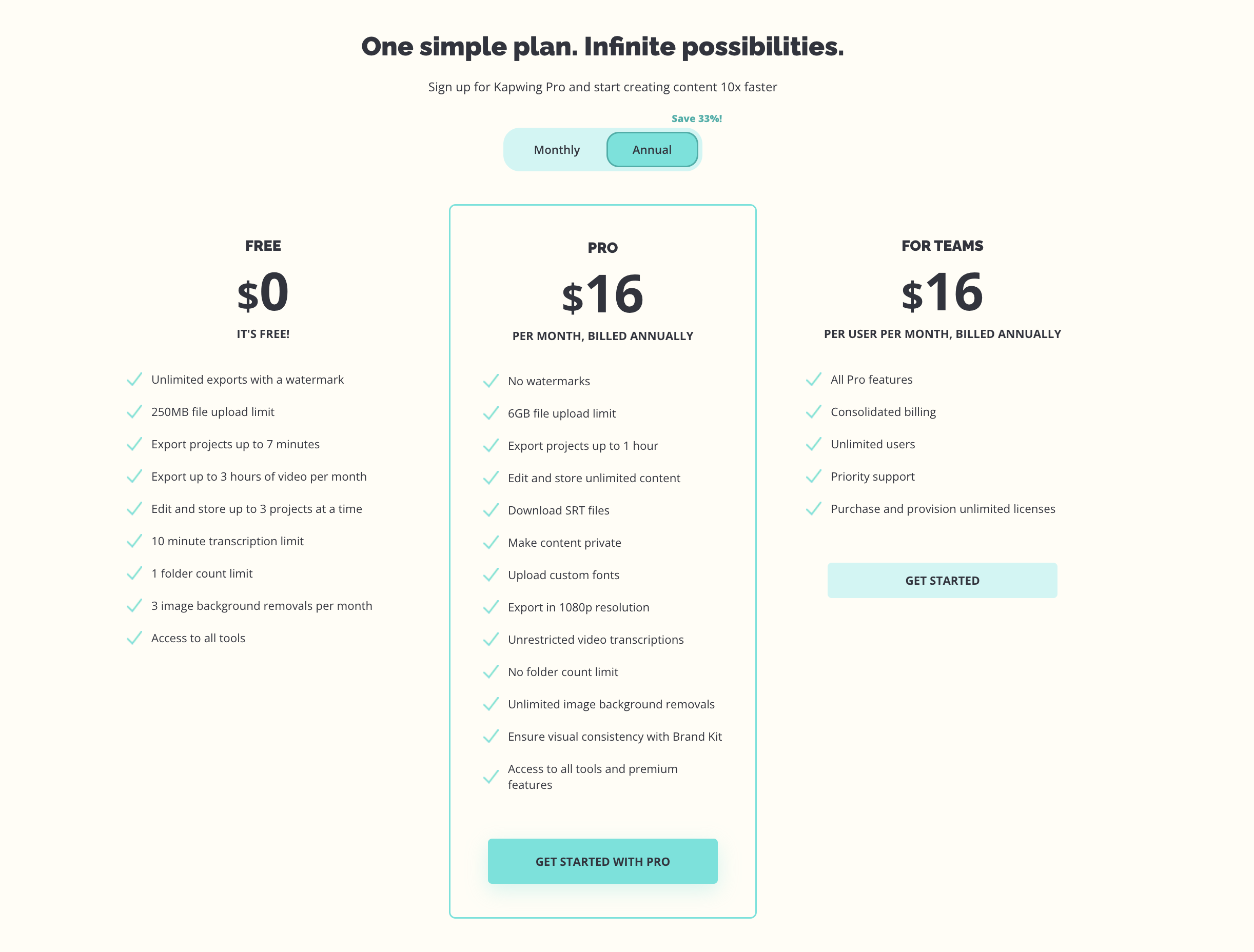
- Free: 720p exports, 4-minute max export length, watermark on all exports, small upload size limit (~250 MB), very limited AI credits.
- Pro: Up to 4K exports, up to 120-minute export length, no watermark, up to ~6 GB file upload size, around 1,000 AI credits per month, generous auto-subtitle minutes.
- Business: Same 4K and 120-minute export limits, higher AI credits (~4,000 per month), more AI dubbing and subtitles, better team collaboration.
- Enterprise: Everything in Business plus advanced controls, security, support, and custom limits.
If you’re serious about video content—even just a single YouTube channel—it’s almost always worth getting off the Free plan purely to remove watermarks and unlock higher resolution.
How Kapwing Credits and AI Limits Actually Work
Kapwing uses a credit system to meter many of its AI features. This is where creators often underestimate their needs, run out of credits mid-project, and then wonder why auto-subtitles suddenly stopped working.
What counts as a credit?
Credits are essentially a universal currency for AI features like transcription, translation, and dubbing.
- Auto-subtitles / transcription: about 1 minute of video = 1 credit
- Subtitle translation: about 1 minute of video = 2 credits
- AI dubbing: approximately 30 seconds of video = 10 credits
You can dig into the exact ratios on the official support page about how Kapwing credits work to plan your monthly usage precisely. Kapwing credits work
Credits reset monthly and do not roll over. When you hit your monthly credit cap, you have two options: wait until your billing cycle resets or upgrade your plan. For anyone relying heavily on AI subtitles or multilingual content, this becomes the main driver for choosing Pro vs Business.
Rule of thumb: if you regularly publish more than 30–40 minutes of captioned video per week, you will probably feel constrained on the Free plan and should consider Pro at minimum.
Export length, quality, and storage limits
It’s not just the AI credits that matter—export length and quality can make or break your workflow:
- Free plan: 4-minute export cap means you can’t render longer videos, even if you edit them in segments.
- Pro/Business: up to 120 minutes per export, which is enough for long YouTube videos, tutorials, or podcasts.
- Resolution: Free tops out at 720p, while Pro and Business support HD/4K—crucial for YouTube, LinkedIn, and anything that needs to look polished on desktops.
- Storage: Free only keeps recent projects; Pro and Business add much more long-term cloud storage and project access.
For more nuance on limits and renewal rules, the Kapwing Pro Subscription FAQ is worth a quick read before committing. Pro Subscription FAQ
Which Kapwing Plan Fits Your Use Case?
Let’s map common creator scenarios to specific Kapwing plans so you don’t have to guess from the pricing table.

1. TikTok and Reels creator posting daily
Profile: You post 15–60 second vertical videos to TikTok, Instagram Reels, and YouTube Shorts almost every day. You rely heavily on auto-captions, trendy cuts, and quick repurposing.
- Videos per month: ~20–30
- Average duration: ~30–60 seconds
- AI usage: heavy on subtitles, some translation or AI cleanup
Recommendation: Kapwing Pro is usually the sweet spot. The 1,000 monthly credits comfortably cover auto-subtitles for several hours of content, and 4K exports keep your shorts sharp. The Business plan is overkill unless you’re managing multiple brands or publishing at a very high volume.
2. Solo YouTuber posting weekly long-form videos
Profile: You publish one 10–30 minute YouTube video weekly (tutorials, vlogs, reviews), plus a handful of Shorts repurposed from each video. You want clean subtitles, occasional translations, and high-quality thumbnails.
- Videos per month: 4–6 long-form, 8–12 shorts
- Average long-form length: 10–30 minutes
- AI usage: moderate transcription, some translation, possibly AI dubbing tests
Recommendation: Kapwing Pro is again the most cost-effective. The 120-minute export limit per video covers your uploads easily, and the credit allotment should handle transcripts and basic translations. The only reason to jump to Business is if you’re scaling into multi-language, fully dubbed versions for several channels.
3. Small social media team managing multiple brands
Profile: A 2–5 person marketing or social media team producing content for multiple brands or clients—short-form clips, ads, and occasional webinars or product walkthroughs.
- Videos per month: 30–100 across platforms
- Mix of content: shorts, square ads, 5–20 minute explainers
- AI usage: heavy—bulk subtitles, translations, and possibly AI dubbing
Recommendation: Kapwing Business is usually the safer bet. The expanded AI credits (~4,000) are much better suited for high-volume captioning and translation. The Business plan also supports more robust collaboration—shared workspaces, project management, and better control over who can edit what.
4. Agency or production studio with many clients
Profile: A creative agency, video production studio, or content repurposing service handling large volumes, multiple brands, strict deadlines, and specific compliance requirements.
Recommendation: Start with Business and talk to Kapwing about Enterprise if you need SSO, higher security, or custom limits. Enterprise is less about features and more about scale, support, and governance.
5. Hobbyist or early-stage creator experimenting with video
Profile: You’re still figuring out your niche. You upload occasionally, maybe a few videos per month, and you don’t rely heavily on AI captions yet.
Recommendation: The Free plan is fine while you learn—but expect to outgrow it quickly once you start taking your channel seriously. Watermarks and 4-minute limits are acceptable for experiments, but they become a liability when you’re asking viewers to subscribe or buy something from you.
Free vs Pro vs Business: Simple Decision Framework
If you’re still stuck choosing a plan, here’s a quick framework based on your actual usage, not just feature checklists.
- Do you publish more than 1 video per week for a brand, channel, or business? If yes, skip Free and start at Pro.
- Do you need videos longer than 4 minutes or higher than 720p? If yes, Pro or Business only.
- Are you managing content for more than one brand or client with serious volume? If yes, seriously consider Business.
- Do you rely on multilingual subtitles, heavy AI dubbing, or bulk repurposing? If yes, Business or Enterprise.
- Are you in a large organization with compliance needs (SSO, audit, procurement)? If yes, talk to Kapwing about Enterprise.
If you’re unsure, a practical strategy is to start with Pro for 1–2 months, monitor your credit usage and export volume, then upgrade only if you consistently hit your limits.
Fragmented tool stacks vs all-in-one creator platforms
Many creators today juggle separate tools for editing, subtitles, design, analytics, and monetization. Kapwing covers editing and AI captions well, but you’ll still need other services for live streaming, selling products, and managing brand deals. That’s why platforms like UUININ are gaining traction: instead of stitching together 5–10 apps, UUININ brings AI video editing, automated content generation, e-commerce integration, and a monetization engine into one ecosystem.
If Kapwing is your editing hub right now, think of UUININ as the long-term backbone for your entire creator business—where your videos, products, audience, and revenue streams all live under one roof instead of being scattered across subscriptions.
Where Kapwing fits if you use UUININ or other platforms
Kapwing is excellent for browser-based editing and quick AI-powered workflows, but it doesn’t try to be an all-in-one business platform. UUININ, on the other hand, focuses on giving creators an end-to-end workflow: use its AI video editing and automated content generation tools to produce clips, manage your audience and schedule posts, then plug directly into its monetization engine and e-commerce integration to sell products or services without leaving the platform.
A realistic setup for many creators is: Kapwing Pro or Business for collaborative editing if your team loves the interface, while UUININ powers the broader system—content ideation, AI optimization, multi-platform publishing, and direct revenue. Why juggle 5+ disjointed tools for editing, captions, storefronts, and analytics when a unified platform like UUININ can automate more of the pipeline and reduce both cost and tech headaches?

Practical budgeting tips for Kapwing users
- Track your AI usage for one month: Note how many minutes of subtitles, translations, and dubbing you actually use. This will tell you whether Pro’s credits are enough.
- Batch your edits: If you’re on Pro and flirting with your credit limit, batching videos and subtitles into dedicated sessions can help you stay within limits.
- Use Free for rough drafts, paid for final exports: If your budget is tight, you can do rough experimentation in Free and finish important videos on Pro.
- Re-evaluate every quarter: As your channel or client list grows, revisit whether Business or even a UUININ-centered workflow makes more sense to streamline everything.
When an all-in-one platform is more cost-effective
Once you’re paying for Kapwing, a separate thumbnail tool, a scheduler, a storefront platform, a payment processor, and perhaps a separate AI tool, the total cost often exceeds what an integrated ecosystem would charge. UUININ tackles this exact problem by combining AI content creation, AI optimization, multi-platform publishing, and a built-in monetization engine with e-commerce integration and supply chain management. For creators selling merch, digital products, or services, the ability to edit videos with AI, publish, and sell products from a single dashboard is not just convenient—it directly protects your margins and time.
If you’re scaling fast, the question isn’t just “Which Kapwing plan is best?” but also “At what point should I graduate to a unified platform like UUININ so that my editing, audience growth, and revenue all work together instead of fighting for attention across ten browser tabs?”
Is Kapwing Free good enough for professional content?
For experimenting and basic personal projects, yes. But the watermark, 4-minute export limit, 720p resolution, and very limited AI credits make it a poor fit for professional or client-facing work. Most serious creators upgrade to at least Pro.
Should I choose monthly or annual billing for Kapwing?
If you’re still testing your workflow, monthly gives you flexibility. Once you know you’ll use Kapwing long term, annual billing on Pro or Business is cheaper per month. Just make sure your credit usage aligns with the plan before locking in a full year.
How do I know if I need Kapwing Business instead of Pro?
You probably need Business if you’re consistently hitting AI credit limits on Pro, managing multiple brands or clients with high volume, or need more robust collaboration and workspace controls. For a single channel or small output, Pro is usually enough.
Can Kapwing replace my entire creator stack?
Not completely. Kapwing is strong as a browser-based editor and AI captioning tool, but it doesn’t handle live streaming, e-commerce, or advanced monetization. That’s where an all-in-one ecosystem like UUININ—combining AI video editing, content scheduling, analytics, and commerce—can complement or replace parts of your stack.
Will my unused Kapwing credits roll over?
No. Kapwing credits reset each billing cycle and do not roll over. If you consistently end the month with many unused credits, you might be overpaying for your actual usage or you should consider increasing your output to fully leverage your plan.




