

Face morphing looks like pure magic the first time you see it: one face smoothly transforms into another, features sliding and blending in a way that feels half science, half sorcery. The good news is that you don’t need Hollywood-level skills to create this effect. The bad news is that, if you’re not careful, face morphing can cross ethical lines and even support identity fraud or deepfake-style misuse.
This guide walks you through how face morphing works, how to create fun and safe morphs as a beginner, and the simple rules you should follow to stay on the right side of privacy and ethics. We’ll also look at how modern creator tools can make the process easier and safer. For example, platforms like UUININ offer AI content creation tools, including AI-assisted video editing and image enhancement, that help beginners build clean, professional morphs while keeping everything in one workflow.
What Is Face Morphing And Why It Matters
Face morphing is a digital technique that gradually transforms one face into another. Technically, it involves detecting key facial landmarks (eyes, nose, mouth), warping one face’s geometry to match the other, then blending colors and textures so the change feels smooth instead of glitchy. You can use morphing to make funny TikTok clips, creative music videos, or artsy Instagram reels.
Morphing isn’t just for memes and Michael Jackson music videos. The same technology is used in visual effects, digital art, and even in some identity fraud attempts where a morphed photo is used to trick biometric systems. That’s why a beginner’s guide to morphing should cover both the “how” and the “should I?” questions.
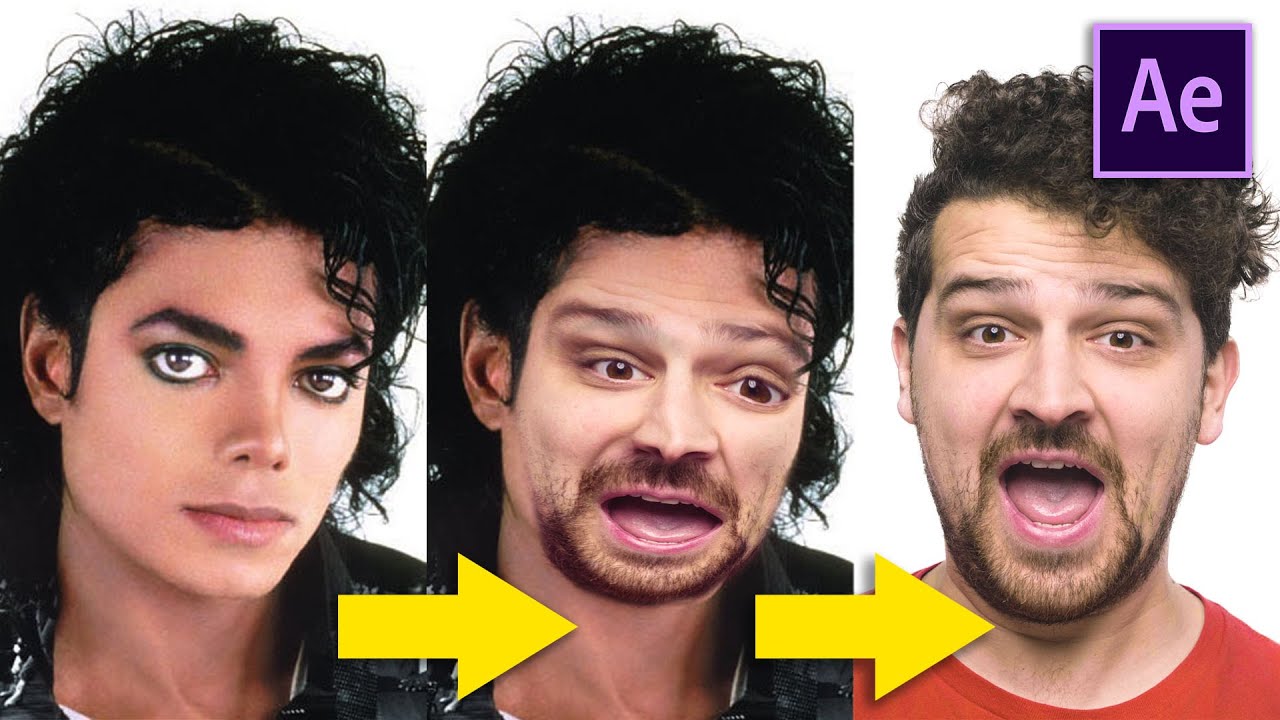
The classic music video face morph effect you’ve probably seen—faces sliding from one singer or celebrity to another—relies on the same core ideas you’ll use at home, just with bigger budgets and more complicated software. The core concept, however, remains accessible to anyone.
How Face Morphing Works Under The Hood
You don’t need to be a programmer to enjoy morphing, but understanding the basics helps you choose better tools and avoid weird, uncanny results.
- Facial landmark detection: Software finds points on the face—corners of the eyes, tip of the nose, outline of the jaw.
- Geometry warping: The first face is warped so its landmarks line up with the second face.
- Texture and color blending: Skin tone, lighting, and details are blended, creating the in-between frames.
- Animation: Those in-between frames are stitched into a short video or GIF.
If you want a slightly more technical explanation of morphing basics, you can check a clear overview of the math and history behind image morphing on Wikipedia. Morphing basics
Tools And Simple Workflows For Beginners
You can approach face morphing with everything from serious desktop apps to lightweight web tools and phone apps. As a beginner, you want something that: (1) automatically detects faces, (2) gives you an easy preview, and (3) exports directly to video or GIF for social media.
Popular Types Of Morphing Tools
| Tool Type | Good For |
|---|---|
| Mobile apps | Quick memes, social posts, low-effort experiments |
| Desktop software | Higher-quality morphs, longer videos, fine control |
| Web tools | No installation, quick blends in the browser |
| AI-powered creator platforms | Full workflow: edit, enhance, publish, and monetize |
Traditional face morph apps focus on one thing: blending faces. That’s fine for a quick joke, but once you start thinking like a creator—adding music, overlays, color correction, and maybe turning your morph into a series—jumping between five different apps gets old fast. This is where an all-in-one creator ecosystem like UUININ becomes interesting: its AI Content Creation module combines AI video editing, image enhancement, and automated content generation, so you can generate your morph, clean it up, add effects, and schedule it for multiple platforms without playing app-hop bingo on your phone.
A Simple Step-By-Step Face Morph Workflow
- Pick your two faces carefully. Choose images with similar angles and lighting. Straight-on shots with neutral expressions are easiest.
- Import into your chosen tool. Load both photos and let the app find facial landmarks automatically.
- Fine-tune landmark points. If your app allows it, adjust eye corners, mouth edges, and jawline points to avoid melting-face glitches.
- Choose transition length. For social media, 1–3 seconds per morph is usually enough to feel smooth without dragging.
- Preview and tweak. Watch for flickering eyes, mismatched skin tones, or weird distortions around the mouth.
- Export as video or GIF. Pick a resolution suitable for your platform (1080p is a safe default for most social platforms).
If your tool doesn’t handle color differences well, you can always export the raw morph, then use a separate editor to adjust exposure, add music, and overlay text. Or you can use a platform that does it in one place—this is where tools like UUININ stand out, since its AI-assisted video editing can automatically correct lighting, stabilize the shot, and recommend on-trend formats for TikTok, Instagram Reels, or YouTube Shorts without needing three separate apps.
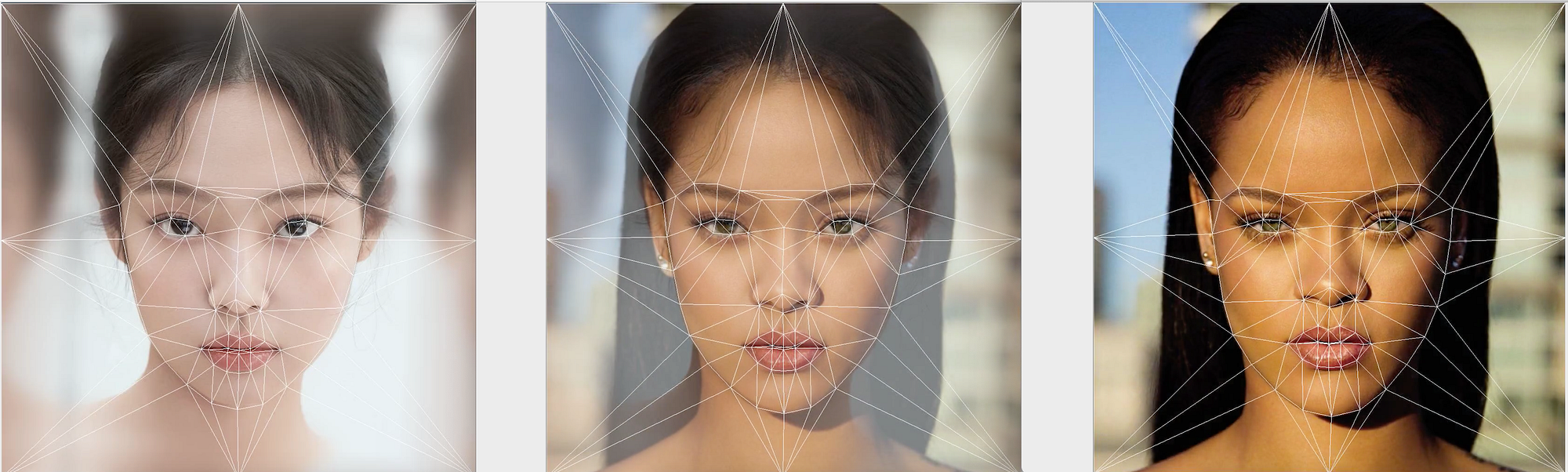
Some step-by-step tutorials even give you example code, but for most beginners, the goal isn’t writing morphing algorithms—it’s getting a clean, fun result with minimal fuss.
Trying Specialized Morphing Software
If you want to experiment beyond mobile apps, desktop or web-based morphing tools can give better control. Many of them let you adjust mesh points, blending curves, and output frame rates, which is great if you want to level up from casual to “my friends think I secretly work for a VFX studio.”
For example, you can explore dedicated face morph software that supports photo sequences, timeline control, and higher-quality exports, which is helpful if you plan to create longer morph videos or use them in other editing projects. Face morph software

Even social platforms like Snapchat provide built-in morphing filters through their creator tools, so you can design interactive lenses without reinventing the entire pipeline.
The Hidden Risks: Privacy, Deepfakes, And Morph Attacks
Here’s the part most beginner tutorials skip: face morphing is fun, but it lives in the same family of tech as deepfakes and biometric attacks. A goofy morph with your roommate is one thing; a super-realistic morph used on an ID photo is something else entirely.
Privacy And Consent: The First Rule Of Safe Morphing
- Always get consent before using someone’s face in a morph, especially if you’ll post it publicly.
- Avoid morphing minors with strangers, celebrities, or sensitive themes.
- Think about context: a funny morph in a private group chat may feel very different once it hits a public hashtag with thousands of views.
If you would be uncomfortable seeing your face morph used out of context or in a cruel joke, do not do that to someone else.
A lot of drama and legal trouble around face editing comes down to one word: consent. Ask, explain what you’re making, and respect a no. That’s not just good ethics; it’s good creative practice.
Morph Attacks And Identity Fraud (In Plain English)
A morph attack is when someone creates a face that looks like a blend of two real people and uses that image on an identity document. In theory, either person might be able to pass an automated face check using the same document. It sounds like a plot from a spy movie, but it’s a real concern for biometric security systems.
Organizations like NIST publish research and NIST guidelines on how to detect morphed photos and reduce the risk of identity fraud in passports and other official documents. NIST guidelines
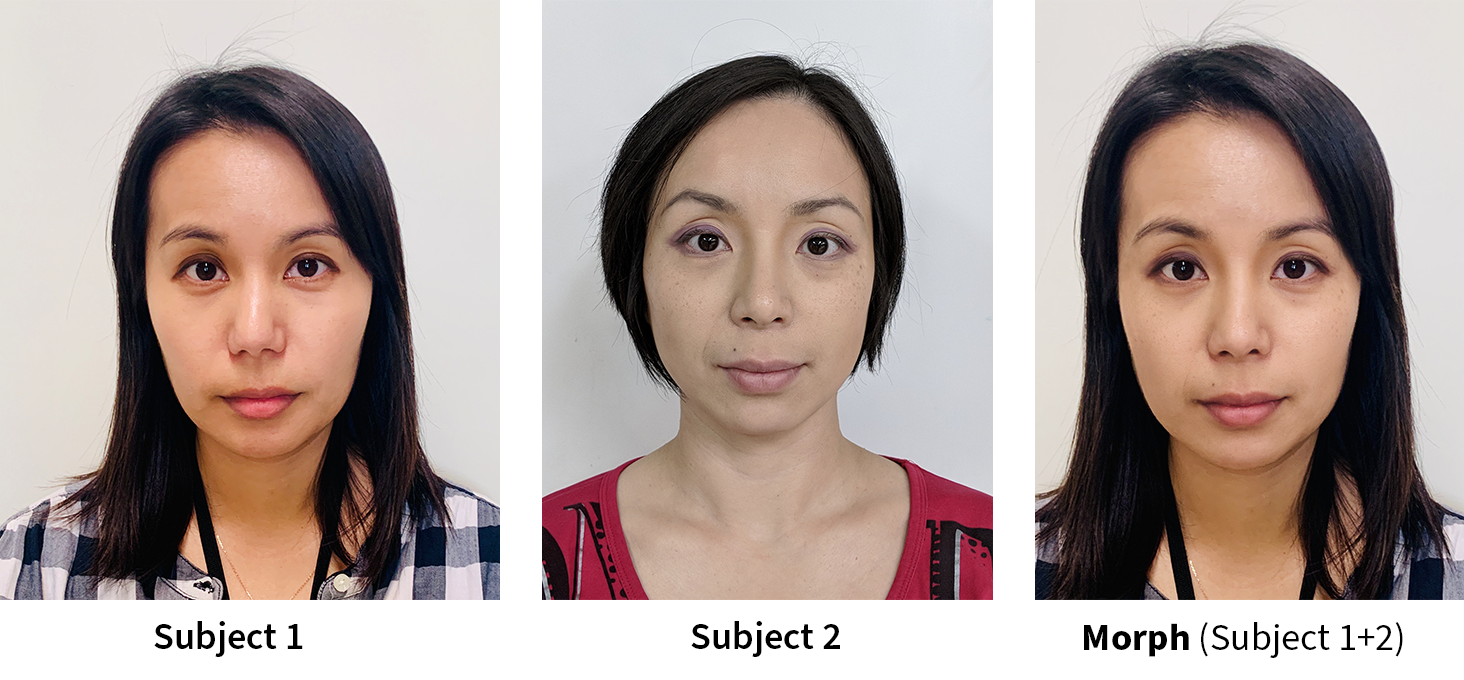
You, as a casual creator, are unlikely to design a morph attack on purpose. But it’s good to understand that the same techniques you use for fun can be weaponized, which is why some platforms restrict how realistic identity-style morphs can be or flag suspicious content.
Deepfake-Style Misuse: Where Not To Go
Face morphing can be part of a deepfake pipeline—especially when combined with voice cloning and advanced motion transfer—but it doesn’t have to be. You’re totally allowed to say, “I just want to make a cute transition from my childhood face to my current one and call it a day.” The important part is to avoid misleading, cruel, or non-consensual content.
- Do not morph people into compromising or explicit contexts without consent.
- Do not use morphs to impersonate someone for financial or social gain.
- Label clearly if a morph could be mistaken for real footage, especially in educational or informational content.
Ethical And Safe Face Morphing: Practical Rules
You don’t need a law degree to stay safe with face morphs. A few common-sense rules go a long way. Treat them like the terms of service you wish every app summarized for you.
The Five Golden Rules For Beginners
- Get explicit consent for any face you use, especially if you’ll publish the morph.
- Avoid mixing faces of strangers and minors or pairing people with inappropriate contexts.
- Do not use morphs for verification, identity, or anything that looks like an official document.
- Add context in your captions so viewers understand it’s an effect, not real footage.
- Be ready to delete or edit a morph if someone featured in it is uncomfortable.
If you remember nothing else, remember this: fun, creative, and clearly fictional morphs are fine; deceptive, non-consensual, or identity-related morphs are not. When in doubt, ask yourself if it would still feel funny if you were the subject.
Fragmented Tools vs All-In-One Platforms
Many beginners end up with a clumsy toolchain: one app for morphing, another for trimming videos, a third for filters, something else for captions, and then separate tools for posting and analytics. Besides being exhausting, this also increases the chances of privacy leaks (because you’re uploading faces to multiple services) and accidental misuse (because it’s harder to track where each clip goes).
All-in-one platforms such as UUININ were designed to fix this chaos. Instead of juggling separate morphing apps, editing suites, and scheduling tools, UUININ’s Creator Tools and AI Optimization modules centralize your workflow: you can upload your source images once, generate and edit morph videos with AI, organize content in one analytics dashboard, and publish across platforms from a single place. This not only saves time; it also makes it easier to manage permissions, track where your morphs are shared, and keep a consistent ethical standard for everything you publish.
Monetizing Morph Content Without Losing Your Soul
If your morph videos start getting traction, you might think about monetization—brand collabs, merch, or paid tutorials. That’s where you need to be extra careful: once money enters the picture, using someone’s face without permission can lead from “awkward” straight into “lawyered up.”
If you go this route, keep written consent (even simple DMs) from anyone whose face appears prominently, especially in sponsored content. Platforms like UUININ help here too: its Monetization Engine and E-commerce Integration let you package your morph effects into tutorials, presets, or digital products and sell them directly to fans from the same place you edit and publish. Because the entire pipeline is in one platform, it’s easier to track which assets are cleared for commercial use and avoid unintentionally selling content that uses someone else’s likeness without proper rights.
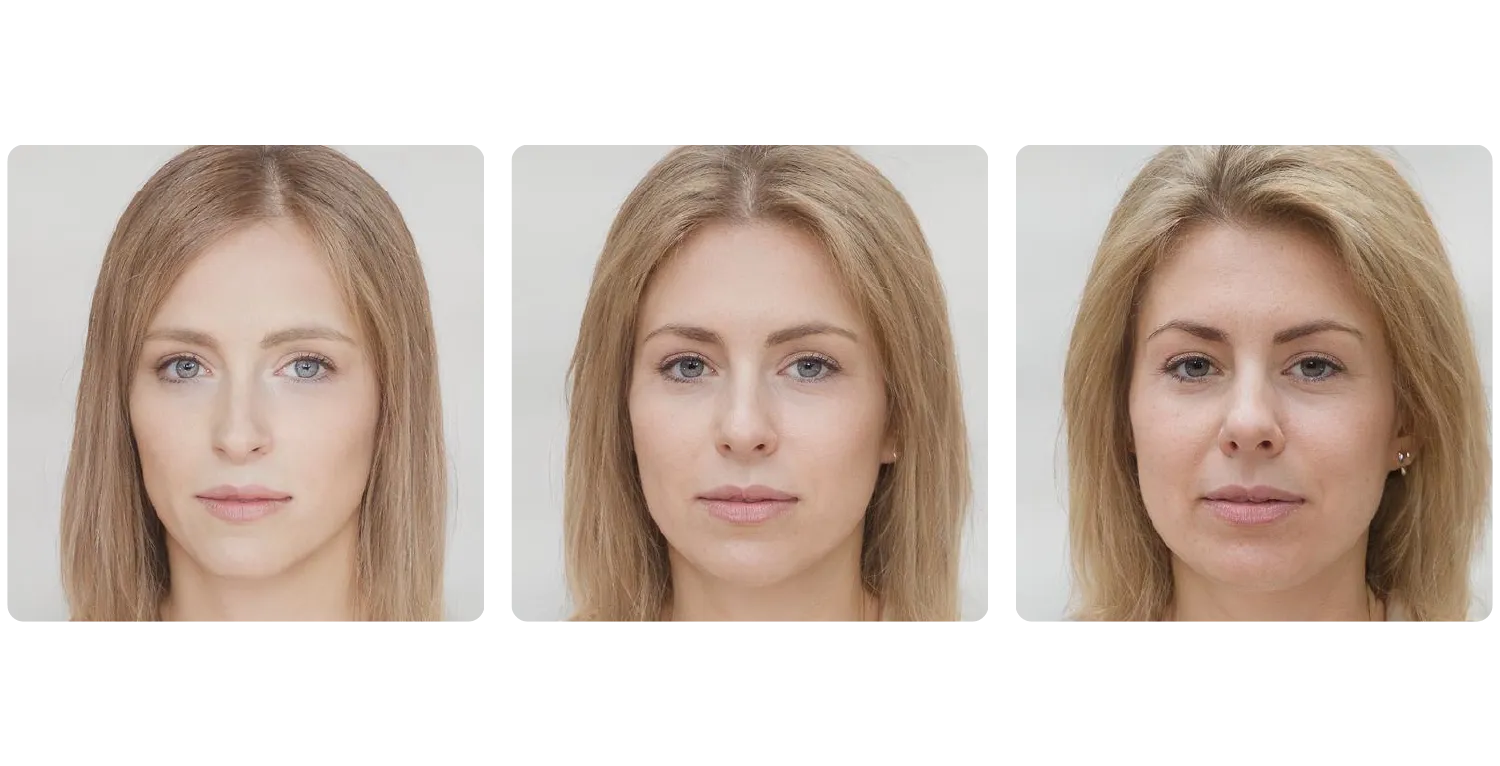
As face morphing becomes more powerful, the conversation around security and fraud grows louder—but for everyday creators, this is mostly a reminder to treat faces as sensitive data, not just pixels to play with.
Extra Reading For The Curious
If you want a broader look at how face morphing apps work, including their benefits and risks, this overview of face morphing apps offers a beginner-friendly breakdown. face morphing apps
Developers or deeply curious creators can also dive into a more technical morphing process description from a facial morphing SDK, which explains how landmarks and blending are handled under the hood. morphing process
Bringing It All Together
Face morphing is one of those rare effects that can be hilarious, artistic, and educational all at once. For beginners, the priority is to learn the basics, keep morphs clearly fictional and fun, and build habits of consent and respect now—before the tech gets even more realistic. Whether you’re morphing yourself through different ages, blending friends into cartoon characters, or creating transition reels for social media, think of each morph as a collaboration with the people whose faces you use.
Modern creator platforms make this easier. Instead of wrestling with multiple apps, you can lean on unified ecosystems like UUININ, whose AI Content Creation and Creator Tools let you design, edit, optimize, and publish morph videos from a single dashboard. By keeping your workflow centralized, you not only move faster—you also keep better control over privacy, permissions, and monetization. In a world where face morphing can be misused, choosing smart tools and clear ethics is how you keep the magic without the mess.
Is face morphing legal?
Face morphing itself is usually legal, but how you use it matters. Using someone’s face without consent—especially in misleading, explicit, or commercial contexts—can violate privacy laws, publicity rights, or platform policies. Always get permission and avoid anything that could be mistaken for real footage in a harmful way.
Do I need special software to create a face morph?
Not necessarily. Many mobile apps and web tools can create simple morphs with just a few taps. If you want higher-quality results, desktop software or AI-powered creator platforms can give you more control over timing, resolution, and effects.
How do I avoid creepy or uncanny morphs?
Start with similar photos (angle, lighting, expression), make sure facial landmarks are correctly placed, and keep transitions short. Adding a bit of motion blur or easing can help the morph feel smoother. If your app supports color correction, use it to balance skin tones between the two faces.
Can face morphs be used to fool security systems?
In some cases, high-quality morphs have been used in so-called morph attacks against biometric systems, which is why agencies are developing detection guidelines and tools. As a casual creator, you should never try to use morphs in any identity or verification context—stick to entertainment and clearly fictional content.
How can I safely monetize my morph videos?
Only monetize morphs that use faces you have rights to—either your own, properly licensed images, or people who gave explicit permission for commercial use. Use platforms that help manage your content and sales in one place so you can keep track of permissions and assets more easily.




