Looking to bring your social media videos to life with creative voice effects? Whether you’re a TikTok comedian, a YouTuber telling stories, or a casual creator making memes for friends, a great video voice changer can make your content stand out. In this guide, we’ll walk you through the top tools—covering mobile, desktop, and online options—so you can find the perfect fit, regardless of your budget or skill level. Let’s help you upgrade your content with ease!

What to Know Before Choosing a Video Voice Changer
Not all voice changers are created equal. Before you hit record, ask yourself: Do you want to change your voice live as you shoot, or tweak it after filming? Are you looking for subtle, realistic modulation or over-the-top cartoon effects? And—let’s be real—how much are you willing to spend? Here are the key considerations:
- Real-time vs. post-production: Some tools let you change your voice live, others only after you finish recording.
- Effect quality: Natural, AI-powered voices versus fun, dramatic filters.
- Lip sync: Tools that sync voice with video look way more polished.
- Platform compatibility: Make sure the tool works on your device (mobile, desktop, online).
- Budget: Free tools can be powerful, but premium ones unlock extra features.
Why Use a Video Voice Changer for Social Media?
Voice changers are no longer just for prank calls. Today, they’re essential for creating funny skits, character voiceovers, and even adding privacy or mystery to your videos. They’re a shortcut to more engaging, dynamic content—especially on platforms with short attention spans. Want to sound like a robot, a cartoon character, or your favorite celebrity? There’s a tool for that!
Pro Tip: Voice effects can boost engagement by up to 40% on TikTok and Instagram Reels, according to recent creator surveys!
The Best Video Voice Changer Tools for Every Need
Let’s break down the top video voice changer tools for different platforms and use cases. Whether you want a quick AI-powered effect or a professional desktop editor, there’s a solution below.
| Tool | Best For | Highlights |
|---|---|---|
| FalcoCut | AI voice effects in video (cartoon, celeb, more); lip sync | Upload video or TikTok, wild effects, easy interface |
| Kapwing | Natural-sounding AI voiceovers online | 49 languages, 180 styles, licensed voices |
| Media.io | Quick browser-based effects | Voice filters, pitch, format support |
| Filmora | Desktop edits with voice effects | Tons of filters, easy video+audio workflow |
| DemoCreator | Realistic, character voiceovers | Natural voices, simple UI |
| Movavi Video Editor | Creative modulation on desktop | Robot, pitch, and fun effects |
| VideoDubber.ai | Audio voice changes + translation | Multiformat, effects, translation |
| Voicemod | Real-time/live voice effects | Integrates with editors, live or recorded |
Top 3 Online Video Voice Changers
- FalcoCut: Perfect for TikTokers and meme creators. It lets you upload any video or just paste a TikTok link, then swap voices to anything from cartoon characters to dramatic narrators. Results are synced and wild. Try it free at FalcoCut.
- Kapwing: If you’re after professional, multilingual AI voiceovers, Kapwing’s online tool delivers. Choose from dozens of voice styles and languages—great for global creators. Explore it at Kapwing.
- Media.io: For quick, easy browser-based voice changes, Media.io is a solid pick. Add pitch effects, fun filters, or subtle changes right from your phone or laptop. Get started online at Media.io.
Try FalcoCut for free AI-powered video voice swaps.
Explore the AI voice changer tool on Kapwing.
Get started with Media.io for instant browser-based voice effects.
Best Desktop Apps for Pro Edits
For creators who want more control over their edits, desktop software is king. Here are some of the top picks:
- Filmora: Offers a big library of voice effects, AI-powered tools, and a streamlined interface for mixing audio and video with ease. It’s beginner-friendly but powerful enough for ambitious projects.
- DemoCreator: Also from Wondershare, DemoCreator focuses on natural-sounding voice changes. Great for voiceovers, narration, and more realistic content.
- Movavi Video Editor: If you want creative modulation—robots, monsters, chipmunks, and more—Movavi bundles these into an easy drag-and-drop editor.
Discover Filmora’s voice changer features for desktop editors.
Explore DemoCreator for realistic AI voiceovers.
Mobile Apps for On-the-Go Voice Changing
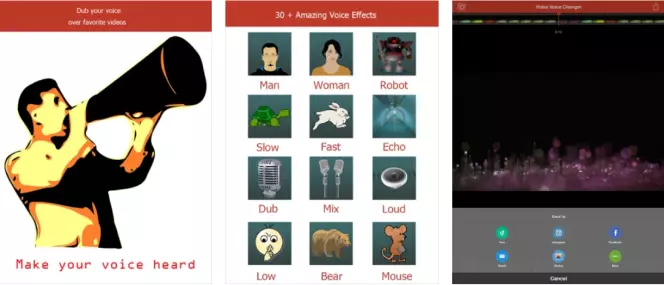
Editing on your phone? There are plenty of fun, user-friendly apps—search 'Video Voice Editor' or 'Video Voice Changer' on your app store. Some let you record live, others let you import clips and add wacky or professional effects with a tap. Make sure to check ratings and always test before using on important projects!
Tips for Getting Pro-Quality Results
- Record in a quiet environment to minimize background noise.
- Preview your voice effect with your video to check if lip sync is accurate.
- Don’t overdo effects unless you’re going for full comedy. Subtlety often works best.
- If using celebrity or copyrighted voices, check platform rules—some ban impersonation.
- Export your video in high resolution to keep both visuals and audio crisp.
My personal rule: If I wouldn’t laugh at it twice, I don’t post it. Test your effects on friends—if they cringe, pick a different style!
Are Voice Changers Safe to Use?
Most reputable video voice changers are safe, especially when downloaded from official sites or app stores. Avoid suspicious downloads—stick to well-known platforms for best results. And remember: using voices that clearly impersonate real people can cross legal or ethical lines, so always use effects responsibly.

