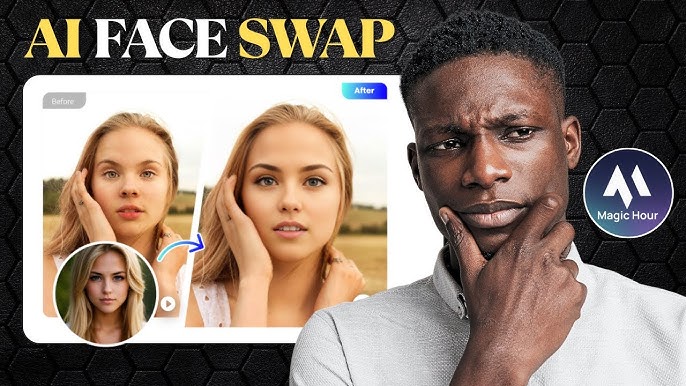
If you’ve ever scrolled past a jaw-dropping face swap video or an animated meme on Instagram or TikTok, you’ve likely seen the magic of AI video generation at work. For creators, marketers, and even students, standing out on social media is tougher than ever. Enter Magic Hour AI – the browser-based platform that makes professional-quality video creation accessible to everyone, no editing degree required. In this guide, we’ll walk you through using Magic Hour AI to craft viral-ready content, share insider tips, and help you avoid common pitfalls. Ready to level up your content game? Let’s dive in.
What Is Magic Hour AI?
Magic Hour AI is a San Francisco-based, browser-first platform dedicated to democratizing video and image creation with AI. Launched in 2023 by former Meta and Skillz engineers Runbo Li and David Hu, it’s attracted over 5 million users worldwide (and counting). Its mission is simple: remove technical and financial barriers to high-quality visual storytelling, giving everyone an equal shot at going viral. The platform’s wide array of AI tools—face swapping, text-to-video, lip sync, animation, and more—are optimized for the fast-moving world of social media content.

Above: Instantly swap faces in your videos or photos with Magic Hour AI’s intuitive tools—no Photoshop skills required. This is a game-changer for creators looking to personalize memes, reactions, or promotional content in seconds.
Why Magic Hour AI? Key Benefits for Content Creators
- No downloads or heavy software—everything runs in your browser
- Step-by-step templates for beginners and advanced workflows for pros
- Face swapping, animation, lip sync, style transfer, and more
- Freemium pricing: free for casual use, scalable plans for power users
- Easy sharing to Instagram, TikTok, YouTube, and beyond
“Magic Hour is like Canva for AI video: pick a template, customize, and publish—without the headaches.”
Step-by-Step: Creating Viral Videos Using Magic Hour AI
- Sign up for a free Magic Hour account on their website.
- Browse the template gallery or select a tool (e.g., Face Swap, Text-to-Video).
- Upload your source media—photo, video, or even just a text prompt.
- Customize: Swap faces, add motion, apply effects, or sync audio.
- Preview and download your video. Share directly to your favorite platform.
Above: Creating a face swap video is as simple as uploading two images and letting Magic Hour’s AI do the rest. The results are often surprisingly realistic—and hilarious!
Best Practices for Viral Content
- Keep it short: Under 30 seconds works best for TikTok & Instagram Reels.
- Lean into trends: Recreate trending memes or scenes, but add your unique twist.
- Use high-contrast visuals: Eye-catching colors and clear motion make users stop scrolling.
- Tell a story: Even a 10-second video with a punchline or surprise pays off.
- Experiment! Test different templates and styles to see what resonates with your audience.
Magic Hour AI Pricing: Is It Really Free?
| Plan | Monthly Cost | Key Features |
|---|---|---|
| Basic | Free | Limited credits, low-res, watermark, upload limits |
| Creator | $12 | More credits, HD, watermark removal, commercial use |
| Pro | $49 | High credits, full HD, priority, more features |
| Business | $249 | 4K, enterprise usage, large uploads, all features |
For a full breakdown, view the latest Magic Hour AI Pricing.
The free plan is great for experimenting, but comes with watermarks and lower resolution. If you’re serious about building a brand or business, the Creator plan unlocks watermark-free downloads and higher quality footage. I found the jump from Basic to Creator to be worth every penny if you want to look polished and professional.
Popular Tools & Creative Use Cases
- Face Swap: Put your face (or a client’s) into viral meme templates.
- Text-to-Video: Turn simple prompts into animated explainer clips.
- Image Animator: Add subtle or wild motion to still photos.
- Style Transfer: Apply artistic effects or brand colors to any video.
- Lip Sync: Make any face sing or speak—perfect for music trends or parody.
Above: See how Magic Hour stacks up as a free AI video generator. The platform’s workflow is genuinely fast and intuitive—perfect for creators who want to ship content quickly and iterate often.
Real World Examples
- A small business owner creates a weekly face swap meme to promote discounts.
- A student animates a historical figure for a TikTok explainer project.
- A marketer uses style transfer to match videos to a brand’s color palette.
Magic Hour AI: Pros, Cons, and Honest Review
| Strengths | Limitations |
|---|---|
| Runs in-browser, easy for beginners | Free tier has watermarks, low-res |
| Lots of creative tools | Can be slow for longer videos |
| Affordable scaling—pay as you grow | Some outputs look 'too smooth' for pro use |
Confession: I’ve spent more time than I’d like to admit swapping faces with Magic Hour, and it never fails to get a laugh (or a like). But for high-end client work, you’ll still want a pro editor in your toolkit.
Tips to Maximize Your Magic Hour AI Experience
- Start with high-resolution source images and videos for best results.
- Use short clips—processing times increase with video length.
- Preview the watermark placement before sharing on branded channels.
- Experiment with free credits, but budget for paid plans if you need quality.
- Check their blog for new feature updates and creative inspiration.
Above: A look at the latest Magic Hour AI tools. The platform frequently releases updates, often based on user feedback—so it’s worth keeping tabs on what’s new.
Ready to Go Viral? Start Creating With Magic Hour AI
Getting started is as simple as signing up and experimenting. Magic Hour’s interface is friendly enough for newcomers, yet powerful for those who want to push boundaries. If you’re stuck, their help docs and active Discord community are fantastic resources. The future of content is AI-assisted—and with platforms like Magic Hour, it’s never been easier to join the wave.
Learn more and start creating at the official Magic Hour website.
Quick Comparison: Magic Hour AI vs. Other Tools
| Feature | Magic Hour | Runway ML | Canva Video |
|---|---|---|---|
| Face Swap | Yes | Limited | No |
| Browser-based | Yes | Yes | Yes |
| Pricing | Freemium | Paid | Freemium |
| Templates | Many | Fewer | Many |
| Best For | Viral videos, memes | Pro editing | Brand design |
While Runway and Canva are solid choices for different audiences, Magic Hour’s sweet spot is rapid, viral social media content—particularly if you want to personalize trends without heavy editing know-how.
Above: Not just for videos—Magic Hour lets you enhance images too, from golden hour filters to background swaps and more. It’s a one-stop shop for visual experiments.
Want More? Useful Resources
- Official Magic Hour Blog: Case studies and creative ideas
- Discord Community: Get real-time feedback and support
- Y Combinator Profile: Learn about Magic Hour’s mission and growth
Read more about Magic Hour’s Y Combinator journey.

